Run your due diligence request list in the data room
Most due diligence request lists still live in Excel, passed between inboxes until nobody knows which version is current. Here is how Dealdrive takes the list you already have and turns it into requests in the data room, with a named person who delivers and a status that is always current.

Eirik Kadota-Isaksen
Chief Executive Officer · · 5 min read
Most due diligence request lists are still Excel files. An advisor sends a list with a few hundred rows. The company's CFO forwards tabs to finance, legal and HR. Answers come back as new versions: DD_request_list_v6_AJ_comments.xlsx, then DD_request_list_v7_FINAL (2).xlsx, in a thread called "Re: Re: Fwd: Updated DD list – see tab 3".
Meanwhile the documents go into the data room. The list says one thing, the room says another, and someone spends Friday afternoon reconciling the two.
We built the request list in the Dealdrive data room so that the list and the documents are the same thing.
In short: you import the request list you already have. Every request is a folder in the data room, with a brief, a due date and a named person who delivers. Files are uploaded straight into the request. The reviewer accepts the delivery or sends it back with what is missing, and every request shows whose move it is.
What is a due diligence request list?
A due diligence request list, also called an information request list or a DD checklist, is the list of documents and information a buyer and its advisors ask the seller to provide. It is organised by workstream, such as financial, legal, tax, commercial and HR, and in a mid-market deal it often runs to several hundred items.
Every item needs two people: someone on the seller's side to find the documents, and someone to confirm that what came back answers the request, either the seller's advisor or the buyer. On a sell-side process, the seller's advisor often runs the same kind of list with management, to fill the data room before buyers are let in.
Why the spreadsheet breaks down
A spreadsheet is a fine way to write a request list. It is a poor way to run one.
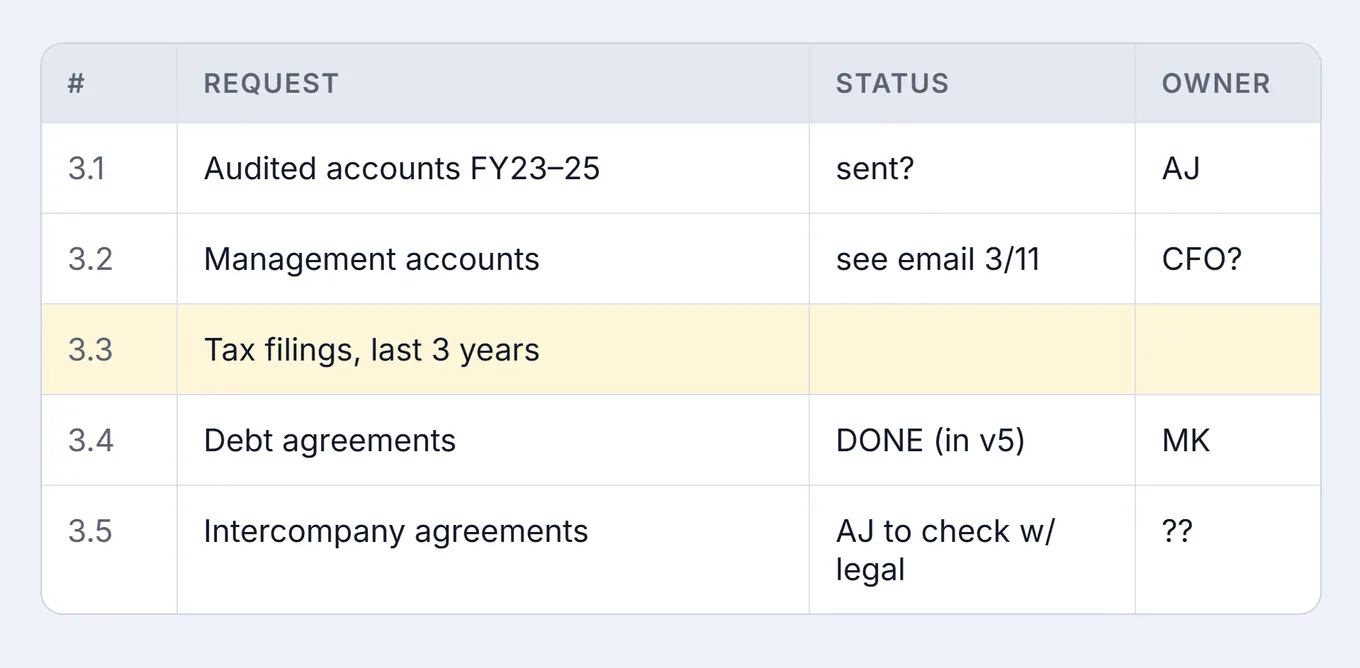
- Versions drift between inboxes. Every reply creates a new copy, and nobody is sure which one is current.
- Nobody knows what has been delivered, or who is holding it up. Status cells say "sent?" or "see email 3/11", and the owner column says "CFO?".
- The list lives in one place and the documents in another. To check whether item 3.4 is done, someone has to open the data room and look.
Import the list you already have
There is no need to retype anything. Upload the request list as Excel, CSV, Word or PDF, and Dealdrive reads its sections and requests. Names come through as written, and the numbering follows the structure: 01 Financial, 01.02 Historical financial information, 01.02.01 Audited annual accounts.
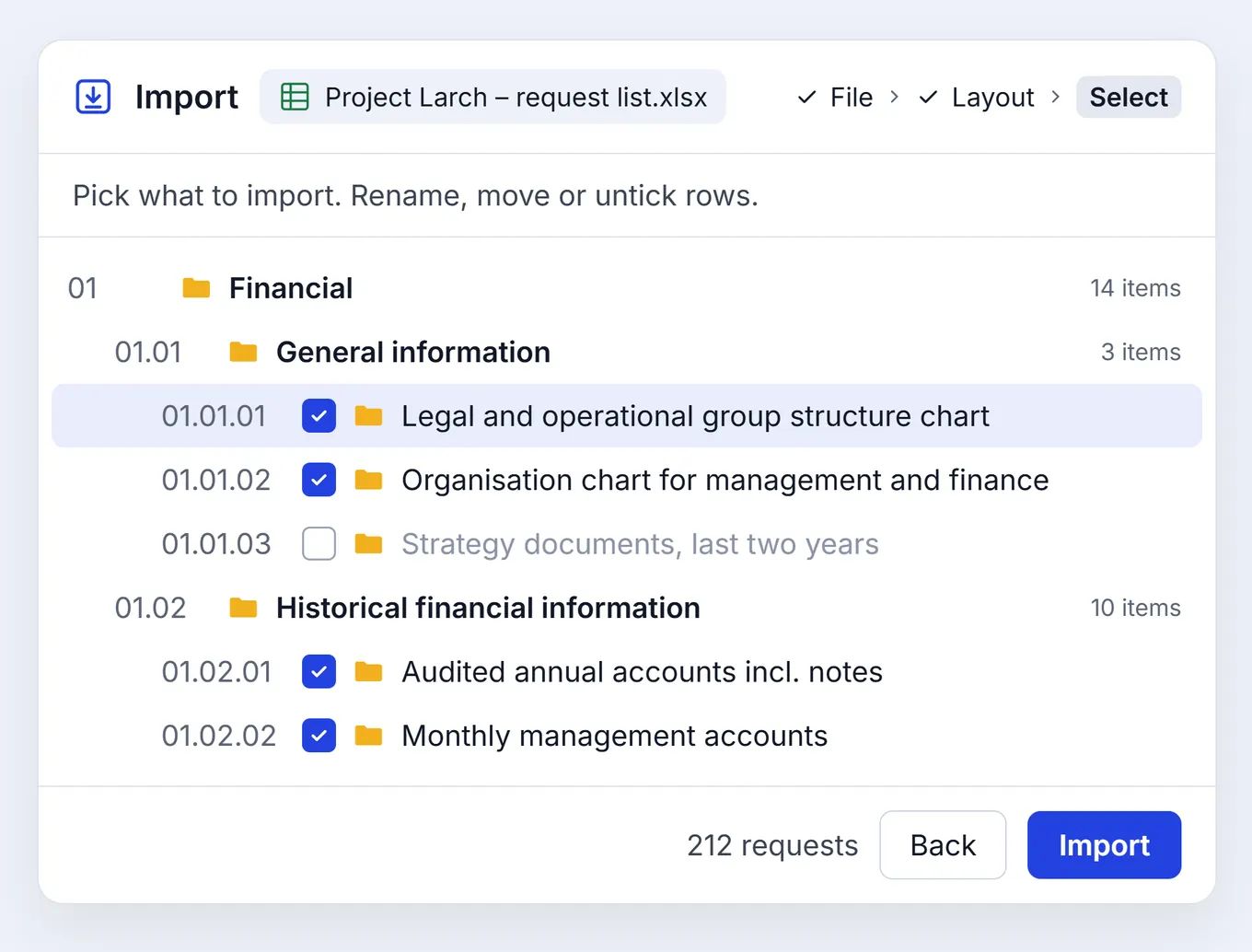
You check the result before anything is created. Rename, move or untick rows, and if a file's layout was read the wrong way, correct it and the list is rebuilt. The requests are only created when you press Import.
Every request is a folder
In Dealdrive, each request is a folder in the data room. It has a brief in plain words: what is needed, for which period, in which format, by when and at what priority. And it has a named person who delivers.
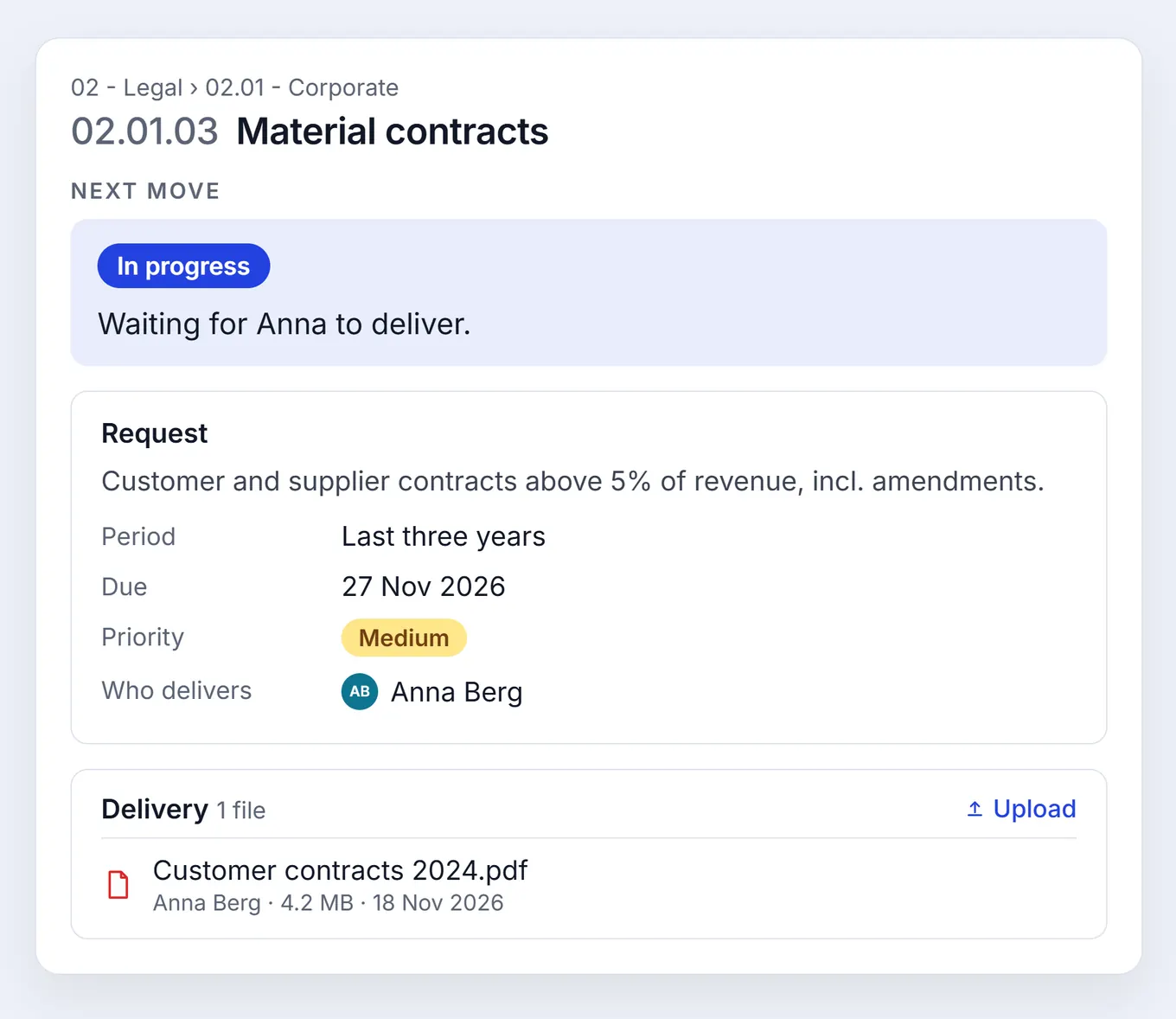
The person who delivers is someone in the data room, not a column of initials, and you can name more than one. They get an email when a request is assigned to them, a reminder two days before it is due, and another if it goes overdue.
They upload files straight into the request's folder, and the request moves to In progress. When they are done, they mark it delivered, with the files or a written response. Because the files are in the folder, the list shows what is really in the room, not what someone remembers sending.
Accept it, or send it back
A delivered request waits in the reviewer's list. They open it, read the files next to the brief, and accept it or send it back. Sending a delivery back means saying what is missing, and that note goes to whoever delivers.
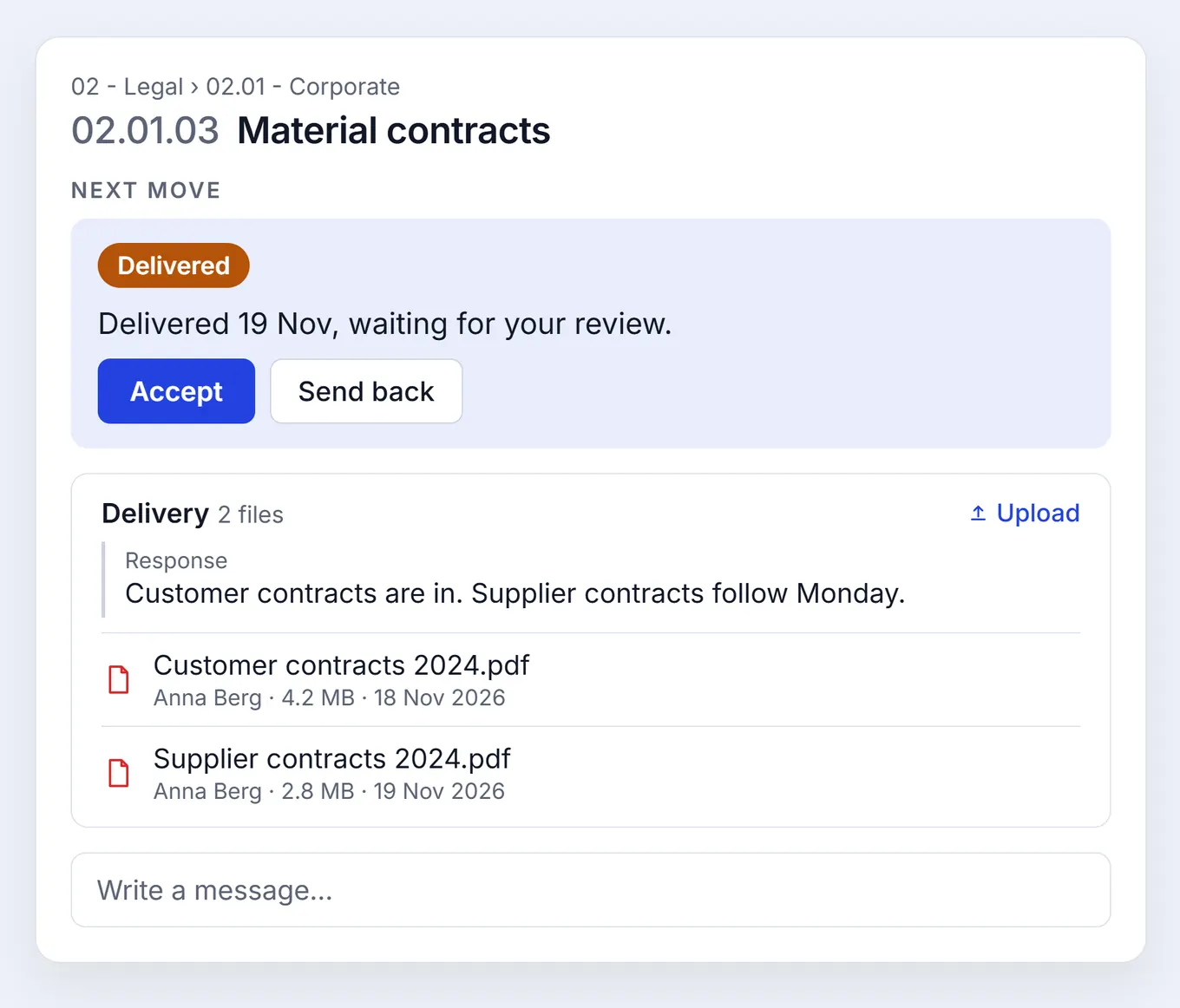
Every request has its own conversation, shared by everyone working on it: whoever manages the list, the people who deliver and the reviewer. Follow-ups stay with the request instead of in a separate email thread. Its history lists every change, who made it and when, and where an imported request came from.
Always know whose move it is
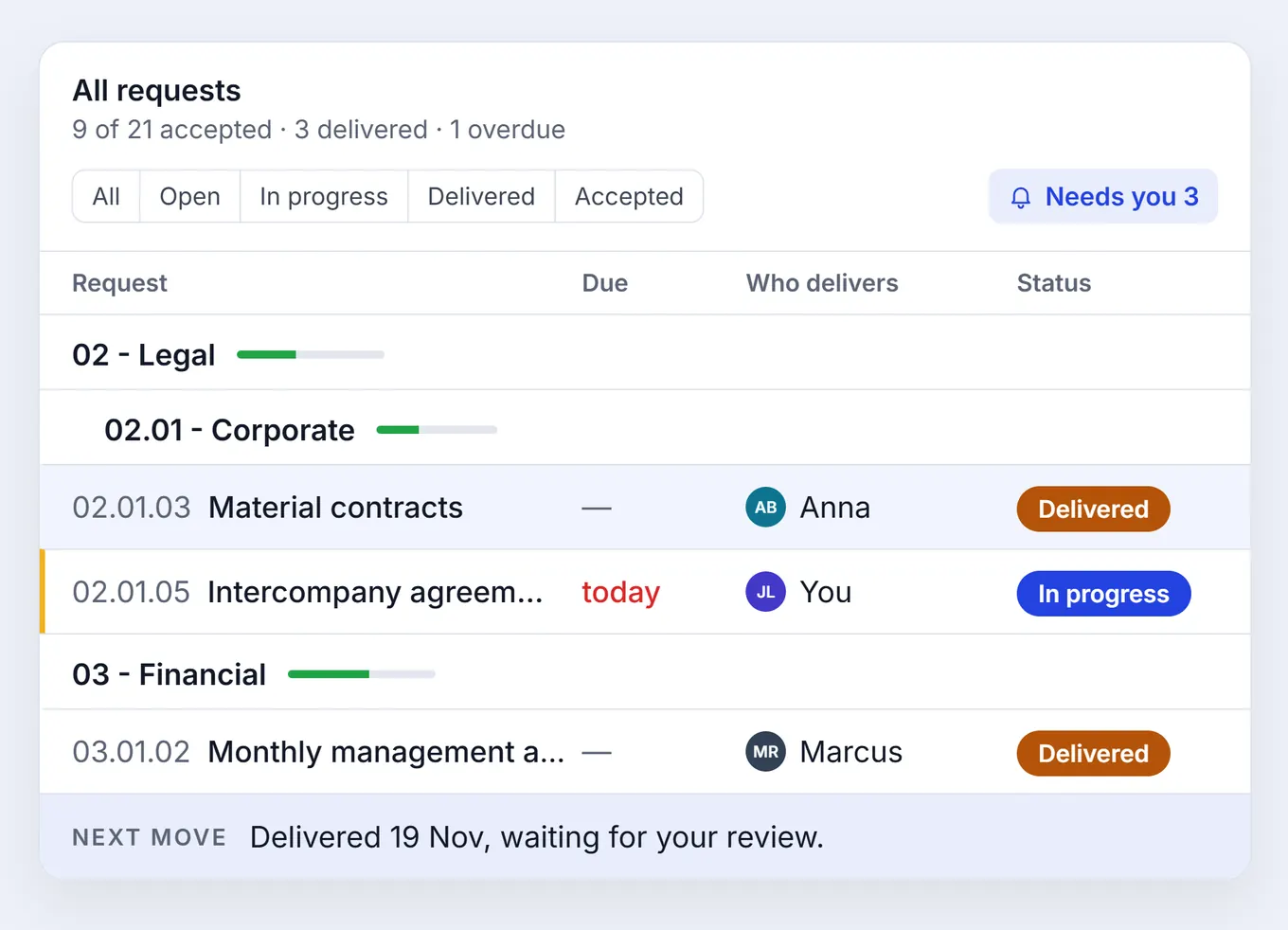
Every request states its next move in a sentence: "Waiting for Anna to deliver." "Delivered 19 Nov 2026 by Anna, waiting for your review." "Accepted 20 Nov 2026. Nothing more to do."
The list shows progress for each section and a summary line such as "9 of 21 accepted · 3 delivered · 1 overdue". You can filter by status, by your own requests or by overdue ones. Needs you shows only what is waiting on you: deliveries to review if you are a reviewer, and requests still to deliver if you are the one delivering.
When the list is needed outside the data room, Export gives an Excel file with every request and its status.
Sell-side and buy-side
The request list works in both kinds of data room. These are the typical workflows:
- Sell-side. The seller's advisor manages the list and reviews deliveries, and the company's management team delivers.
- Buy-side. The buyer reviews, and the sell-side delivers. This is typical for a bilateral process with one seller and one buyer, or where the buyer sends the request list.
In both, people only see the requests whose folders their team can open.
What this changes in a deal
- One list, one version. Everyone works in the same list, so there is no v7 to reconcile.
- Clear ownership. Every request has a named person who delivers it and a reviewer who accepts it.
- A list that matches the room. Delivered means the files are in the folder. Accepted means someone has read them.
Once the data room is prepared and buyers are let in, their questions go to due diligence Q&A, where buyers ask the data room first. See how it works for sell-side advisors and buy-side advisors, or book a walkthrough.
Questions and answers
Which file formats can a request list be imported from?
Excel (.xlsx and .xls), CSV, Word, PDF and plain text. You check the result before anything is created, and nothing is added to the data room until you press Import. You can also start from a blank Excel template.
Who delivers a request, and who reviews it?
The sell-side delivers, usually the company's management team. The review is done either by someone on the same side, such as the seller's advisor, or by the buyer. You can name more than one person to deliver a request, as long as they are in the data room and their team can open the request's folder.
How is the request list different from Q&A?
The request list is how the data room gets filled. It sets out what the seller needs to provide, and each request is a folder that holds the documents once they are delivered. Q&A is for questions about a data room that is already prepared, when a buyer needs an explanation or cannot find something in the documents.
Does the request list work in buy-side data rooms?
Yes. In a buy-side data room, the buyer and its advisors run the request list and review deliveries, and the seller delivers into it. That is typical in a bilateral process with one seller and one buyer, or where the buyer sends the request list.
Can buyers see a sell-side request list?
Not by default. In a sell-side room, buyers see nothing of the request list unless you make a buyer the reviewer. You can also share request descriptions with buyers, and then they see a request's description on its folder, and nothing else.
Can we export the request list back to Excel?
Yes. Export gives an Excel file with every request and its status, due date, priority, description and who delivers it, with a link back to the request in the data room.
More articles
See how Vera runs your next deal
Book a 30-minute walkthrough of the data room and Vera.